Debian Admin - Your way to Debian World

October 28, 2006

Galternatives - graphical setup tool for Alternatives Configuration in Ubuntu

by @ 11:54 pm. Filed under Other Linux

If you're new here, you may want to subscribe to my RSS feed. Thanks for visiting!

There are several programs fulfilling the same or similar functions to be installed on a single system at the same time. For example, many systems have several text editors or different web browsers installed,Multimedia players,graphics editors at once.


galternatives is graphical setup tool for the alternatives system.A GUI to help the system administrator to choose what program should provide a given service.

The /etc/alternatives defines default applications for Unix/Linux system this includes the default application to handle web browser,splash etc..

Install Galternatives in Ubuntu

If you want to install galternatives you need to enter the following command

sudo apt-get install galternatives

This will complete the installation.Now if you want to open this application you need to run the following command

gksudo galternatives

You should see the following screen here you can choose which applications you want to use default
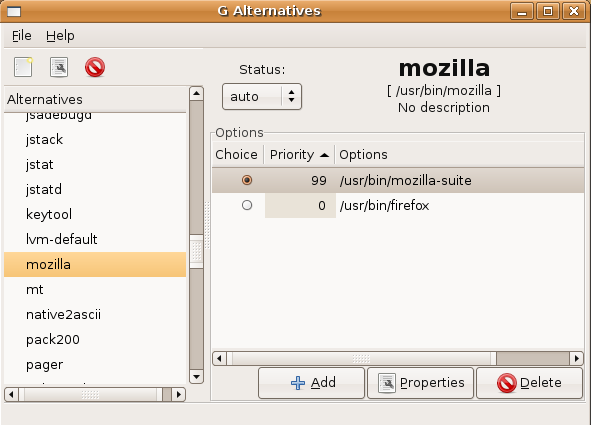
Galternatives version details

Tags: , , , , , ,

You may also be interested in...

Leave a Reply

Subscribe RSS Feed

subscribe to the Debian Admin RSS feed

Internal links:

Sponsors:


Categories:

Support Debian Admin

Amount $:
Website(Optional):

Sponsors:

Archives:

WidgetBucks - Trend Watch - WidgetBucks.com

Related Links:


WidgetBucks - Trend Watch - WidgetBucks.com

Favourite Sites:

Wordpress Collection
Windows Reference
Ubuntu Geek
DebianHelp
All About Debian Tutorials
Power Electrical
Check Your IP Here
Debian,Ubuntu News
DebCentral
Tuxmachines
Capnkirby
Libervis
Nuxifield
Linux Horizon
Linux Appfinder
Debuntu
GNU/Linux For Everyone
Free Penguin
DebianAdmin is not related to the Debian Project.
This site is copyright © 2006,2007 Debian Admin
All Trademarks are the property of their respective owners.
The contents of this website may not be mirrored or archived without the express written permission of DebianAdmin Site Owner.

DISCLAIMER: All the information, troubleshooting methods, utilities offered in this website is provided AS-IS, without any warranties. Though I strive for perfection, and always test the validity and effectiveness of the troubleshooting content in various systems, I assume no responsibility for your use of these Fixes, Utilities and other troubleshooting advice. The author will not be liable for any special, incidental, consequential or indirect damages due to loss of data or any other reason. All use is completely at your own risk. Changes to the existing content and new additions are made to this website periodically, without notification.
Rodney's Kontera DynamiContext Plugin plugged in.