Ubuntu 7.04 is the current stable version of the Ubuntu operating system. The common name given to this release from the time of its early development was “Feisty Fawn”.
Before Upgrading You need to remember the following point
Take comple backup of your system before upgrading
Now you need to upgraded my Ubuntu Edgy Machine to Ubuntu Feisty.
We can Use Two methods to upgrade Ubuntu Edgy to Ubuntu Feisty
1) Using GUI
2) Using apt-get
Upgrading Ubuntu Edgy to Ubuntu Feisty
Method 1 – Using GUI
If you want to upgrade using GUI use the following command
gksu “update-manager -c ”
“-c” switch tells it to look for upgrades at all.
You should see the following screen here Now you can see 7.04 is available for upgrade click on upgrade

Now you should see the release notes as follows here you need to click on upgrade

Once you click on upgrade you might get the error “Authentication failed”

You need to fix the above error for this open the terminal and type the “gpg” and press enter once you see the following message
gpg:Go ahead and type your message …

Press Ctrl+C and then start the install process again.
Now you should see the following screen downloading upgrade tool

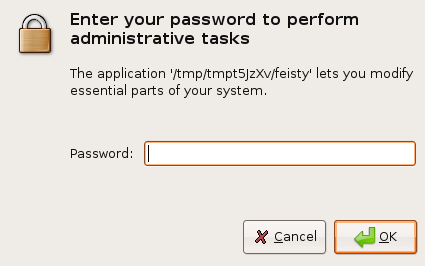
You need to enter root password and click ok
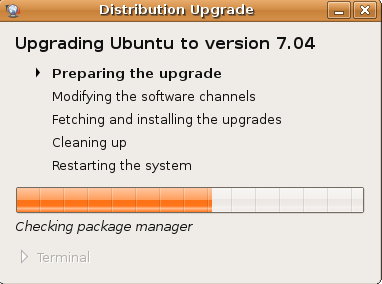
Preparing the upgrade in progress
You need to confirm the upgrade process by clicking “Start Upgrade”

Download in progress for all the required packages for Upgrade

Installation in progress

If you click on Terminal to see detailed installation in progress

Cleaning Up is in Progress

You need to restart the system to complete the Upgrade by clicking “Restart Now”
Method 2 – Using apt-get
Edit your /etc/apt/sources.list as root. Change every occurrence of edgy to feisty.
Use any prefered editor. If you have a CD-ROM line in your file, then remove it.
sudo vi /etc/apt/sources.list
or
use the following Simple command
sudo sed -e ’s/\edgy/ feisty/g’ -i /etc/apt/sources.list
Now you need to update the source list using the following command
sudo apt-get update
Upgrade using the following command
sudo apt-get dist-upgrade
Double check your process was finished properly using the following commd
sudo apt-get -f install
sudo dpkg --configure -a
Now you need to Reboot your machine to take your new ubuntu 7.04 installation to effect all changes.
Testing Your Upgrade
You can check the ubuntu version installed using the following command
sudo lsb_release -a
Output Looks like below
Distributor ID: Ubuntu
Description: Ubuntu feisty (development branch)
Release: 7.04
Codename: feisty
or
Just type the following command in your terminal
cat /etc/issue
Output Lokks like below
Ubuntu feisty (development branch) \n \l
im getting this error
Failed to fetch http://givre.cabspace.com/ubuntu/dists/edgy/main/binary-i386/Packages.bz2 Sub-process bzip2 returned an error code (2)
Hallo there,
SOrry tu buzz in like this, but i had a running WEB/SQL/Mail server on ubuntu 6 and decided to
upgrade to 7.04 from your tutorial…and guess what…it messed up my entire system.
Fortunate enough i had a backup from my important files and i dediced to migrate to debian for more stability 🙂
So i just thought you should know, that this did not work for me .
Anyways, i`m glad you posted this here. I am also sure that if you would have a “empty” system, this might have worked 🙂
Cheers, and no offence 🙂
Mircea Coste
mircha.net
yea i to get past the Authentication error but if it start to upgrade like the first point it does something for a while and then hits this error ailed to fetch http://ee.archive.ubuntu.com/ubuntu/dists/edgy/main/binary-i386/Packages.gz 404 Not Found [IP: 194.126.124.38 80]
Failed to fetch http://ee.archive.ubuntu.com/ubuntu/dists/edgy/restricted/binary-i386/Packages.gz 404 Not Found [IP: 194.126.124.38 80]
Failed to fetch http://ee.archive.ubuntu.com/ubuntu/dists/edgy/main/source/Sources.gz 404 Not Found [IP: 194.126.124.38 80]
Failed to fetch http://ee.archive.ubuntu.com/ubuntu/dists/edgy/restricted/source/Sources.gz 404 Not Found [IP: 194.126.124.38 80]
Failed to fetch http://ee.archive.ubuntu.com/ubuntu/dists/edgy/multiverse/binary-i386/Packages.gz 404 Not Found [IP: 194.126.124.38 80]
Failed to fetch http://ee.archive.ubuntu.com/ubuntu/dists/edgy/universe/binary-i386/Packages.gz 404 Not Found [IP: 194.126.124.38 80]
Failed to fetch http://security.ubuntu.com/ubuntu/dists/edgy-security/main/binary-i386/Packages.gz 404 Not Found [IP: 91.189.92.166 80]
Failed to fetch http://ee.archive.ubuntu.com/ubuntu/dists/edgy-updates/main/binary-i386/Packages.gz 404 Not Found [IP: 194.126.124.38 80]
Failed to fetch http://ee.archive.ubuntu.com/ubuntu/dists/edgy-updates/restricted/binary-i386/Packages.gz 404 Not Found [IP: 194.126.124.38 80]
Failed to fetch http://ee.archive.ubuntu.com/ubuntu/dists/edgy-updates/main/source/Sources.gz 404 Not Found [IP: 194.126.124.38 80]
Failed to fetch http://ee.archive.ubuntu.com/ubuntu/dists/edgy-updates/restricted/source/Sources.gz 404 Not Found [IP: 194.126.124.38 80]
Failed to fetch http://security.ubuntu.com/ubuntu/dists/edgy-security/restricted/binary-i386/Packages.gz 404 Not Found [IP: 91.189.92.166 80]
Failed to fetch http://security.ubuntu.com/ubuntu/dists/edgy-security/main/source/Sources.gz 404 Not Found [IP: 91.189.92.166 80]
Failed to fetch http://security.ubuntu.com/ubuntu/dists/edgy-security/restricted/source/Sources.gz 404 Not Found [IP: 91.189.92.166 80]
and with that it hits everywhere when i try to either upgrade or install software and i have no idea what to do because im new to ubuntu and i got from a live cd.
And that is why windows and max os rule the planet, and not linux. Not even the ah so userfriendly ubuntu manages to upgrade itself w/o a major hassle.
I am a rather experience unix user, and i am sick of it. If the upgrade authentication works, the dependency check fails, and if that does not fail.. there surely be something else that waste hours/days/weeks time to troubleshoot. It lacks consitency, servers change urls, authentification methods change, keys change – its a big inconsistet mess. I tried above, and i end up with the very same error message anyways.
It does not seem to care that i just did the dbg, wait and then & ctrl-c.
What now? i dont want to deal with encrytion shit – 404 errors on update servers and the like.
So far, the only linux system where this has worked flawlessly was openSUSE
again the germans are way ahead ..
sorry folks, i had a bad day. i dont mean to belittle the assistance given here.