Problem: one have vast raster image, which is needed to be processed and enhanced. And seeing of intermediate result and possibility of tuning the parameters are required.
Solution: the unique image processing tool for processing museum images – nip2 – helps us, and it incorporated in Debian GNU/Linux distribution.
Install nip2 in Debian
#apt-get install nip2
This will complete the installation.
An approach of nip2: images as tables
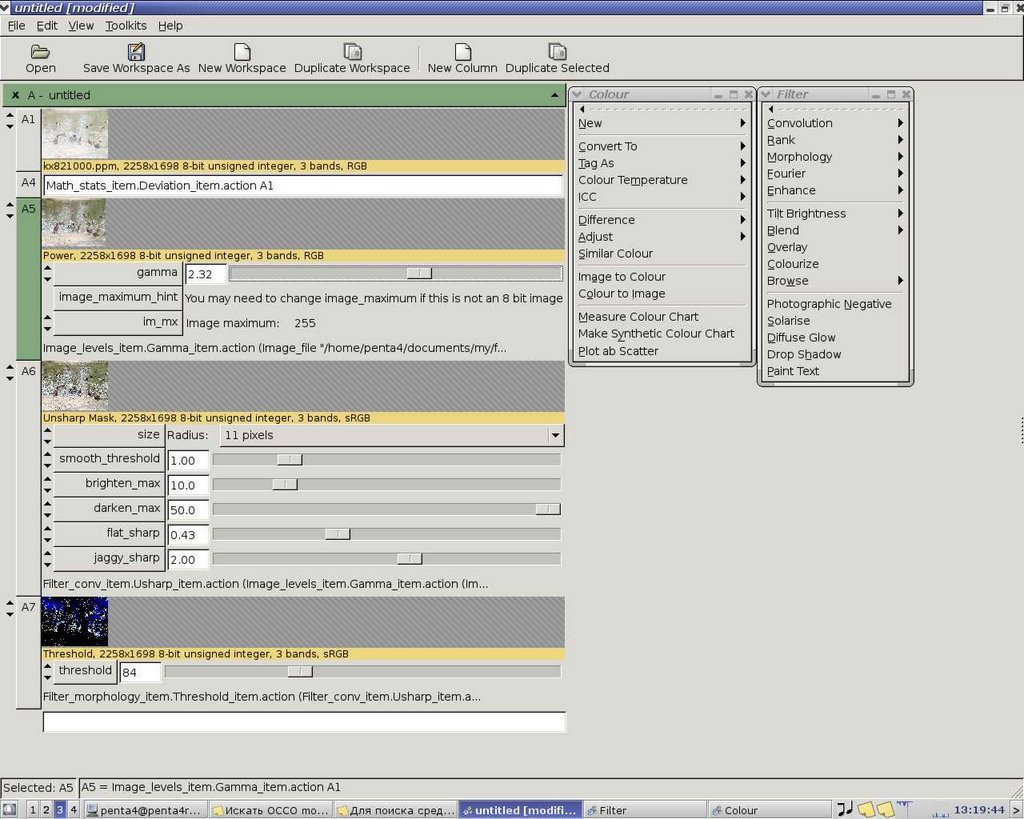
Non-standard and very productive approach is realised in this outstanding program: each image is placed in cell of table. It can be viewed, and it will be appearing by blocks. Such approach saves great amount of time and RAM. When you applying some image processing filter, you selecting the cell with image to be processed. Thus, operative recalculation of image processing results is possible.
Every time when you apply new filter, it brings resulted image to be inserted in next cell of table, where likewise added parameters of image processing filters. Therefore, if you for example change parameters of gamma-correction of image, all following filters, which are applied to image, quickly recalculate final and intermediate results. It`s better to see on a screenshoot.
Nip2 (at least version 7) knows most common graphical file formats, besides they are not multiplicity, the work with them is organized very well.

Besides internal formats, nip2 knows TIFF, PPM, PNG and JPEG. Not so rich, but it`s acceptable for comfort work with graphics.
What NIP2 has and what not
Because program is specialised to work with flat images, there aren`t any tools to work with layers – that is not nip2 business. Withal there are numerous of advanced image processing techniques, implemented as fast algorithms (it`s remarkable that image processing in NIP2 is far more fast than in other programs, such as GIMP)
Pro:
– quick recalculation final and intermediate results all along any filters parameter change;
– work with 8, 16 and 32-bits images;
– advanced image processing techniques are implemented (morphological analysis, Fourier filtering, convolution, statistical noise-reduction techniques and more);
– colour correction and colour profiles are embodied;
– algorithms works very fast, frugal resource consuming;
– outstanding algorithms of large images processing.
Contra:
– no tools to work with layers;
– no image painting tools (only filtering);
At also nameworthy, that NIP2 have unusual (but apt) interface and sometimes inlogical placement of filters in menu. But menus can be unclipped, and most useful filters and instruments will be always close at hand.
Why nip2
Indeed, as it mentioned here, NIP2 – it is only written on GTK2 graphical frontend to VIPS library. This C library is designed for processing vast size images, mainly for studying pictures in museums. Digitized images of artwork are very large image files, and processing them in conventional image editors is practically impossible. Although, many digital filters in image editors have slow techniques because of simplicity of implementation.
NIP2 have a lot of features besides large image processing, so I hope that this program helps you, too.
Links
Here is great survey about image processing libraries in Linux – it`s about VIPS, too, in which NIP2 is based.