There can be a few occasions where you may need to manually purge the local DNS cache and/or the actual web cache of a Blue Coat ProxySG appliance. While both the DNS cache and web cache will eventually age out it can be helpful to sometimes speed up the process by flushing/purging the DNS and web cache.
Using ProxySG Web console
1) First you need to login to ProxySG device Web console
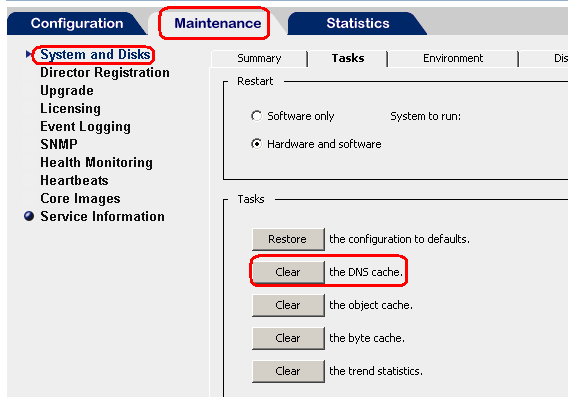
2) Maintenance > System and Disk > Tasks > ‘Clear’ the DNS cache
From Command line
You need to login in to your proxySG device using ssh and also enter the enable password
Now you need to use the following command and press enter
#clear-cache dns-cache
Hello,
can you show me how to disable caching for certain webpage only like google.com?
Thanks.