avast! Home Edition is a complete anti-virus package, that is is free for registered home non-commercial users. It contains an on-demand scanner with two interfaces (simple for novices and advanced for experienced users), an on-access scanner with Standard Shield (which protects against execution and opening malware programs) and an embedded e-mail scanner which scans incoming and outgoing email messages.
Install Avast Antivirus in Ubuntu
First you need to download the .deb package from here
wget http://files.avast.com/files/linux/avast4workstation_1.0.6-2_i386.deb
Now you have avast4workstation_1.0.6-2_i386.deb package.Install .deb package using the following command
sudo dpkg -i avast4workstation_1.0.6-2_i386.deb
This will complete the installation now you need to get the registration key for this you need to fill the online form available here and they will send registration key to your mail address
Applications Menu Setup
or this you need to run a script from the following location
cd /usr/lib/avast4workstation/share/avast/desktop
sudo ./install-desktop-entries.sh install
This will complete the application menu setup.
If you want to access you need to go to Applications—>Accessories—>avast!Antivirus

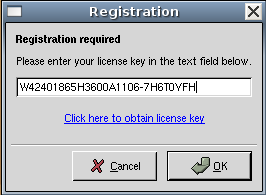
First time it will prompt for license key enter your license key you have got in our previous steps
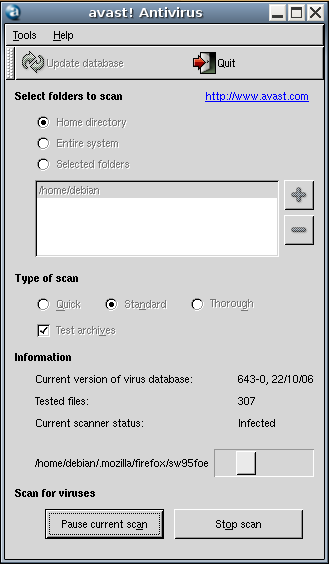
Avast Antivirus Interface

Avast Antivirus database is updating.If you want to update click on update database

You can select the virus scan here and click on start scan
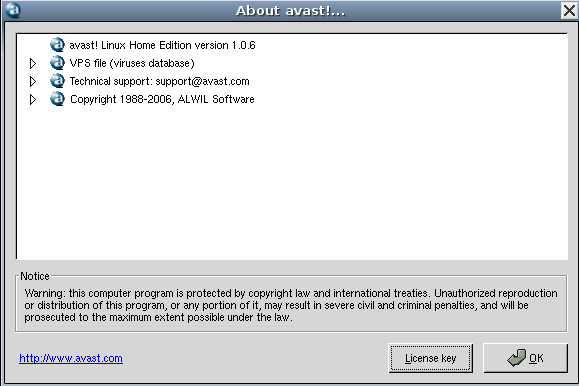
Avast antivirus version details
We are a repair shop and I want to use avast to scan infected windows hard drives.
I got it to install.
If I select thorough it will scan the subfolders too
but I’m having troubles getting it to select the external hard drive on a usb adapter.
I like using ubuntu because it allows me to copy data from windows passworded user acounts without hastle.
And hopefully now I can use it to clean the hard drives too.
needed to post somewhere:
If you got beagle variant of virus and tried avast, norton, eset nod32 & kaspersky with no luck then try
eset sysinspector (free)
panda activescan (free)
by the way I have tried above things including “avast cleaning tool”, symantec “W32.Beagle.MO@mm Removal Tool”, “Virus Removal pack for W32.Beagle@mm” variants,
bit-defender…
what I got from eset sysinspector was a “hidden toolkit” hidden from system.
Have searched alot, seen people given up (reinstalled OS), read that bitdefender and norton repears infected files and mostly hijack logs that seems to show not much including “combi-fix” file (AKA combifix.exe).
The last solution I can come up with is to use ubunto live cd and install avast (may work) or another AV. See this b-u-t-full GUIDE!
Seems like this variant is one of those we never wished to ever see the dayligt.
Message from 2FD (TooFriendsDominating)
What do I have to do if I want Avast starts up automatically when I turn on my computer?
How can I automatically start Avast when I turn on the PC? Many thanks
@ Richie:
You could put the start command for Avast! in your /etc/rc.local and it will run every time you start / reboot
I know lots of people think you do not need AV on Linux. They are all wrong. (1) It is theoretically possible to infect any OS. (2) It is true that Linux is built better than windows but it still can get infected. (3) Today I have a virus on my Ubuntu. In particular, when I print a file, specific letter get replaced by symbol. Instead Doctor I get []octor.
Don’t think like before 9/11, think like after 9/11, if somebody can think it, somebody will do it. We need to put more effort into writing AV.
I have anticirus firewall for my desktop pc. Do I need one for linux also?
I just tried to install your software on my home computer where I am trying to learn Linux. I am running Ubuntu and the following error comes up when I run the command you gave me on your webpage (included).
ubuntu@ubuntu:~/Downloads$ sudo dpkg -i avast4workstation_1.3.0-2_i386.deb
dpkg: error processing avast4workstation_1.3.0-2_i386.deb (–install):
package architecture (i386) does not match system (amd64)
Errors were encountered while processing:
avast4workstation_1.3.0-2_i386.deb
Thank you in advance.
Signed
someone who does not want to run with no antivirus
I run Ubuntu on VMWare. Do I still need an antivirus?
Hi!
This ones are working together very well.
avast: from http://www.avast.com/linux-home-edition#tab4
avast4workstation_1.3.0-2_i386.deb
ubuntu: from http://www.ubuntu.com/getubuntu/download
ubuntu-9.10-desktop-i386.iso
I’m running duel boot Ubuntu 9.10 and Xp on diferent hard drives.
My XP side is so fd up with viruses spyware ect, Id like an avtivirus on the ubuntu side to fix things.
My Windows is so scrood up I think only Linux can fix it.
Dear Sir,
Since yesterday I am getting the following
error while running the debian ver of avast workstation
“An error occurred in avast! engine: Invalid argument”
I have reinstalled avast4workstation_1.3.0-2_i386.deb again
however I am getting same error again.
Pl. sugget solution for it.
Here is the fix for “An error occurred in avast! engine: Invalid argument”.
open home directory
show hidden files
delete .avast folder
open terminal
sudo nano /etc/init.d/rcS
Put the line “echo 128000000 >/proc/sys/kernel/shmmax” before the “exec”
save file
reboot
It might not be necessary to delete the .avast folder in the home directory.
The optimal solution is Kaspersky antivirus in terms of protection and performance.
@2, it’s viruses not virii, not that you’d notice the red spell check line under it as you typed it anyway. Ant-virus has more uses than just scanning for Linux viruses, for example, just a few that spring to mind……… Linux machines that are connected to windows networks and share files with other windows users (not that Linux users care what happens to windows but it would be nice not to pass them on to your friends, colleagues, contacts for business partners), for me in particular I share a lot of files with windows user via USB disks, it’s nice once in a while to scan them and stem the spread of viruses to others. Burying your head in the sand and ignoring the problem doesn’t help anybody.
Michael Bartolucci: Wrong architecture, you run 64 bit Ubuntu and not the required 32 bit (required if you want to install a i386 package). Try download Avast! for 64 bit operating system, if not available then install your box new with Ubuntu for 32 bit.
@Michael Bartolucci:
You can try tar ball.
sir,
i have downloaded trial version of avast anti virus 4.0.. in the process of scanning im
getting several problems . after scanning, i cannot perform the recommended action (move to chest) as it
comes like “communication failed” or some thing like dat.. so plz tel me wat to do after the scan
it is like waste for me to download….
this is the best
I have installed Avast on Ubuntu
However each time I reboot the system, I cannot find Avast in my Accessories Menu. So I have to install Avast each time whenever the system reboots. Can you please tell me a once-and-for-all remedy for this issue?
friends its lg here.
i am new to linux but not to virus. i can recognize the behaviour of virus in my windows. but i shocked with linux ubuntu version. until i connect internet the system runs fine with ubuntu, but as i connect internet the system becomes stupid, as the taskbar becomes invisible or non responsive, the firefox becomes non responsive, the application installer or searcher does not install any application and even dont download the application, the terminal gives error while installing any application of antivirus.
what i mean to say that i just cant even get enough time that i could check my orkut profile.
i feel very shame to those virus builders who are disturbing the linux developers. and making viruses for linux ununtu.
i am electronics engineer and so i cant creat such special thoughts which are necessary to develop a programs, so i respect a lot to such linux developers and wish them great luck for such wonderful thoughts they have devoted to linux projects.
and even after huge number of viruses, i am finally shifted to linux and not looking back.
since my childhood the only thing i saw on my pc was window. and so i got expert in window. but now i think that if i had linux also on another or that same pc then i would be more intelligent in computer world today like other linux users. and i did not had wasted my time in learning games.
those who are father of small childrens are requested by me to plz install only linux on their kids pc and let them to explore the world of freedom and power. this will give satisfaction to my heart that i made other kids life good.
linux is not difficult, but its more powerful with infinite softwares of infinite types, which requires just kinda more time to learn. so its better for kids to start it learning since their childhood age.
sir, recently a virus infected my system… i am running a dual boot (windows xp+ubuntu)…now it is telling that i am not the administrator of windows,when i log on….and i am not able to access anything..(blank screen)..not even task manager…can i give a boot scan with antivirus in ubuntu and hv my sys repaired?? which anti is better for that??
After installed Avast and reboot Ubuntu Lynx, The avast icon into accessory menu there isn’t, i’ve reinstaled it, but i don’ t see the icon, Why?
i am using this Processor type:Intel® Pentium® Dual-Core Mobile Processor T4200,2.0 GHz, 1 MB L2 Cache, 800 MHz FSB. i encounter this error message,
ubuntu@ubuntu:~/Downloads$ sudo dpkg -i avast4workstation_1.3.0-2_i386.deb
dpkg: error processing avast4workstation_1.3.0-2_i386.deb (–install):
package architecture (i386) does not match system (amd64)
Errors were encountered while processing:
avast4workstation_1.3.0-2_i386.deb
how to solve them? help me…
hi to all staff :
i downloaded AV avast but i don now how i can stall it plz tell and many thanks to all of you
note:
i am new using ubonto OS.
thanks a lot….
I like Avast more Kaspersky Anti-Virus
Sir,
Yes really wonderful, it works nicely with Ubuntu , tanks a lot.
thank you i installed by this command:
sudo apt-get install rpm
i,n linux ubuntu 10.4
Guys I have a problem:
I installed Avast antivirus, and scanned my pc for viruses. It found 8 dangerous viruses. Then I clicked “repair” on all of them so It will fix them, and it says “Error: The file was not repaired” :S :S Why?? What should I do? How should I clean them!!??
Please help!